Monday, July 29, 2013

iPad Word Work with Daily 5

Today I'm linking up with 4th Grade Frolics for Monday Made-It! I can't wait to show you how to make word work centers with QR codes! Now... I am so far from crafty but give me a keyboard and a mouse and I can get BUSY. I wish I was more crafty and creative but you win some...you lose some! =) I'll just keep checking Pinterest to find my creativity! ;)


If you have read this little blog for any amount of time, you would know that I LOVE QR Codes. They keep my students engaged and they are so EASY to make. Today I'm going to show you a great way to create QR Code centers for Word Work!


Here is the video tutorial on how I create QR Code Centers for my students!


My students love practicing their words using QR codes. It's perfect for self-checking and it's a fun way for the students to learn! I have these centers that you can grab in my TpT store and they will be on sale for today and tomorrow! You can grab your copy of CVC words, compound words, blends and digraphs, and also pre-primer and primer word scrambles! 


I hope to be back soon to show you all how Work on Writing works with our iPads...but my tonsils are coming out tomorrow! YIKES!

Tuesday, July 23, 2013

Daily 5 + iPads = Serious Engagement and Motivation

It's no surprise that I L.O.V.E technology especially my classroom set of iPads!! {Thank you Title 1!!!} This school year, I was asked to present at our districts Summer Institute about how I have integrated the use of iPads within the Daily 5 framework that I have come to adore!

I decided after such great feedback from my presentations that I would share with all of you the great ways to use iPads. {Note: This can be used in any literacy centers, not just Daily 5!} This week I'm going to share with you how I used iPads for each area of Daily 5.


Listen to Reading

Today I'm going to start with my favorite use of iPads for Listen to Reading. I think listening to reading is VITAL for students reading comprehension, fluency, and a great way for them to fall head over heels in LOVE with reading. In a perfect world I would do 3 or more read alouds a day...however I am lucky if I get one or two in! Get ready because I have found the best FREE way to have a classroom full of books for a listening center!

Video Tutorial
For those of you that are like me and need to see it in action, I created a video tutorial that goes through the steps of creating the recording and the QR Code.  I tried to talk super fast and not have my "teacher" voice but after 4 attempts to get it under 5 minutes..."ya get what ya get!' =)


Step by Step Directions

STEP 1: There is a free website called Record MP3 that allows you to record ANYTHING you want. This is where I record myself reading books from the my classroom library.


STEP 2: All you have to do is press RECORD. When you are done reading, press STOP. {Easy right!}

STEP 3: Then play it back and if you like it press SAVE RECORDING and if you don't press START OVER.  Once you press SAVE RECORDING, the next screen will show you the URL link where your recording is saved. It looks like this....


STEP 4: From here you can either copy the link or save it to your computer.  I usually do both just to be on the safe side! So from here is where it gets really fun!

STEP 5:  COPY the link, open a new table with a QR Code Generator. Copy and paste the link into the text box, make sure the you have chosen STATIC and then press generate STATIC.


VOILA...It has created a QR Code with your voice recording.


STEP 6: copy and paste it into a word document and PRINT.

STEP 7: Then cut out the QR Code and attach it to the book {clear packing tape works best and you can still scan through the tape} and you are done!


On the iPad {or any device} use a scan app to scan the QR Code. I use SCAN that can be found for free in the App Store. Your recording will "magically" appear and your babes can listen to you read their favorite book over and over.

PARENT INVOLVEMENT

One way I like to get parents involved {even if they can't come in to the classroom} is to send home the Record MP3 url. From home, parents can record themselves reading a book, copy the link from the Record MP3 website and e-mail it back to me. Then I can make the QR code and surprise their child! When this is a secret mission between me and the parents, the kids get so crazy excited to hear their mom or dad's voice! **

I hope this is useful for you! Like I said, this can be used in so many different ways in the classroom.  Comment below to share how you use this {or would like to use this} in your classroom!

Friday, July 19, 2013

GUESS WHO'S BACK?!?!

Hello long lost friends! I haven't blogged in MONTHS. Terrible, I know but let me explain...

The end of the school year is ALWAYS crazy fun! I spent my time getting end of the year things together {ya know...slideshow, summer packets, end of the year conferences, records, awards day}, finishing up my last graduate class EVER, and getting ENGAGED!!!!!!!

Can I bore you with the story? Nick and I went to the Biltmore House {what I thought was for an early birthday weekend} and he proposed in the Italian Gardens! I was so SURPRISED, EXCITED, GIDDY....the list goes on and on! After her proposed, he asked me to keep it quiet so we could enjoy our day at the Biltmore and not be on our phones. That lasted all of 30 minutes. I HAD to call my mom {even though she already knew!!} and Nick's parents {the greatest future in-laws on the planet}!! To make the day even more special, it was my parents 29th wedding anniversary! After the proposal, we spent the greatest day just frolicking around the Biltmore House, vineyards, and I was sure to tell EVERYONE that came within 100 yards of me that I just got engaged!


So after being on cloud 9 since May 25th...reality struck this past week! I have to have my tonsils out TWO weeks before school starts and I can't get in my classroom yet....ENTER PANIC MODE! So I am going through and getting every that I can ready for Back to School! I had a lot of requests to make my *FREE* back to school forms editable and I have FINALLY found the time to do that. Just click on the picture and you will have the forms ready for you to edit!


Freebie Fridays

I promise to be back soon with some content {other than wedding ideas!} to share with you!

Happy FRIDAY!

Sunday, March 24, 2013

Addition Rock Stars

My students were struggling (and I mean struggling) with their basic addition facts. It was to the point where I would ask a quick addition fact and I had 2 blurters and 17 blank faces. (Ya feel me?!?) I knew I had to do something to get them excited and get them motivated to learn their facts...and FAST! Hello, they can't go to 2nd grade not knowing their addition facts! YIKES!!! 

So, my kids (along with all Bieber lovin' kiddos) LOVE to sing, dance, and "shake it like Beyonce" as we say in our room. Not to mention, they all think they are the next big Rock Star...so they were my inspiration for this unit! I mean, why crush their dreams?!? If they want to be Rock Stars, I'm going to let them be! {Even if it is under false pretenses!!} 

Ever since we began Addition Rock Stars my students have been begging to practice their math facts (and to tell me how long they practiced them each night)!! Makes my heart smile! 

Here is how it all started. I knew that the ONLY way to get this to work was to get a buy in from the parental units. So, my AMAZING Title 1 Faciliator and I developed a Parent Workshop and invited all the parents and the kids in after school. (So I sent home a flyer with the title "FREE BOOKS AND FLASHCARDS!" Anything FREE brings them in...well that would bring anyone in!) At the workshop I gave them the hard DATA about addition, the importance of practicing facts each night and how addition is the foundation for all things math. It was basically the "BIRDS and the BEES about ADDITION." 

Parent buy in....check! 

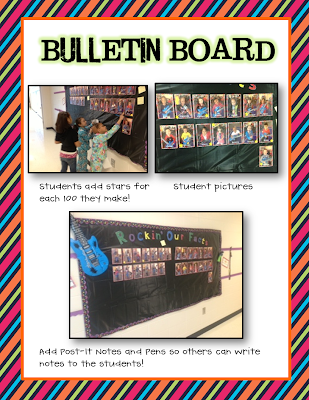
Next up was the student buy in. I put the bulletin board up that is complete with inflatable guitars and microphones. "MISS LANE....WHAT IS THIS?!?!?!?!?!?!" They all begged. I told them that if they practiced their facts then I would put their picture up and they would be Rock Stars.

Student buy in....check! 

First week of the unit...Strep throat HITS our class and hard. I was out for an ENTIRE week. (Well I came to school on Wednesday but was sent to the nurse and sent home!) I had an average of 8 students out per day. YUCK. So we postponed. More time for them to learn the FACTS! 

Finally, the Level 1 Assessment Day was HERE. The kids were so excited. I prayed for NO TEARS. I prayed for 100's. I prayed that I would have enough buttons. I prayed that they practiced! Well, PTL because my prayers were answered!!!! I had 13 out of 19 pass the first level on the first try! WHOOOP! Those nuggets were so proud to wear their buttons and parade around school like ROCK STARS. 

The next week, I had 11 out of 16 pass the second level (we had a few sick nuggets that day). Now, EVERYONE'S picture is on the board. So, when they make a 100 after Level 1, they add a star with the date on it. I'm thinking parents will love to add this to their scrapbooks! 

Here are some pictures of my nuggets, I mean ROCK STARS in ACTION!


I put all of the resources I am using into one packet just for you! This is the perfect too to get your kiddos moving in the right direction! Inside this unit you will find everything you need to create your own addition rock stars! The unit is up and ready for you in my TpT shop and it's ON SALE for tonight and tomorrow! 


I really want to give away this unit, so enter below for a chance to win!! I will announce the winners on Wednesday!!!! 


a Rafflecopter giveaway


I hope everyone has a great Sunday. 4 MORE DAYS until SPRING BREAK!!!!!!


Wednesday, March 20, 2013

QR Code CRAZE!

Have QR Codes taken over your room? Since we became a 1:1 iPad classroom the students (and their teacher) have become obsessed with QR Codes. A QR Code is a "Quick Response" that you can generate using a QR Code generator online. The one I usually use is Kawya QR Code.On this site make sure you have clicked "STATIC" in the gray box.  A QR Code can be created using a website, YouTube Video or just plain text. You can do ANYTHING for a QR Code. Our technology coach even suggested using a "Joke of the Day" and they have to scan the QR Code for the punchline! Hilarious. My kids LOVE jokes. The kind of LOVE where they won't eat their lunch until we read their milk carton joke for the day.

I knew I needed to spruce up my Work on Words center. The kids were getting bored. I was getting bored observing them. Well last night the motivation struck! I finally figured out how to use QR Codes. I immediatley went to The School Supply Addict for some graphics and went to town creating my center. I hustled in to school early, printed, laminated and put together the center. The nuggets went crazy for it! The kind of crazy where they begged me for more so I did a compound word center, and a CVC center and now I'm working on contractions! It's a hot QR mess on my desktop right now!

Here are some pictures of the nuggets in action!


I am a very visual person and I need to see things in action. I figure you are like me, so here is a short clip of two of my sweeties working away!


 You don't have to be a 1:1 iPad classroom. This will work with iPads, iPhones, iTouches, iANYTHING, and Androids have the app too!


Well if you are interested, the new products are up and ready for you on TpT! The CVC Words, Compound Words and Blends and Digraphs are all finished! Contractions and long vowels are up next!


The CVC center was a team effort with one of my best teacher friends! It is the first of many to come! I think I have her addicted.... =)

I hope everyone has a happy humpday! (One more week until Spring Break!!!) 


Saturday, March 16, 2013

Place Value Boot Camp

I love Amanda's Friday Flashback Linky! It's so much fun to get a glimpse into everyones wild weeks! It's also a great way to reflect on what we did and share what worked (and what didn't work goes into the vault!)


So I'm linky up this week to share about our Place Value Boot Camp!

I'm sure you have all heard of the wonderful Teacher Tipster. Well...his videos and I became bff during my week in bed with strep! This week we started Place Value. I knew I wanted my kids to really grasp this concept and after a week with a substitute I knew they would expect/need something big from me! SOO I used the Teacher Tipster's Place Value Boot Camp Idea and just ran with it! We recently became a 1:1 iPad classroom so I knew I wanted to incorporate that also. Here is what we did!

Miss Lane scared the you-know-what out of the kiddos by yelling, screaming and getting in their faces! (Later...one confessed that I sounded like a man. In retrospect, probably not the best lesson to teach after having strep!!  The students wore their "ARMY VESTS" to really get into it! (It's amazing what you can do with a free bag from the grocery store). Next, the students learned the Teacher Tipster song. THEY LOOOOOVED IT!  A table then came to "BOOT CAMP" and were assigned as "talls" or "smalls. The students "at base" had to deteremine what number the soldiers represented.  Once the students got the hang of counting talls and smalls, they took a picture on their iPads. We used the app SKITCH.  Once they took the picture of the soldiers, the used the shape feature to draw base ten blocks around the soldiers and wrote the number they represented in skitch. Then, they saved their work to their camera roll. Finally, they imported the picture into ASK 3 and created a screen cast to explain their thinking. The students loved this lesson and BEGGED to do it the next day!

I created an iMovie to hang in our hallway (I attached it to a QR Code) so visitors can see with their iPads the hard work! Our principal even sent the kiddos a video congratulating them on their hard work in boot camp!


The next day was a great field trip to see "Seussical the Musical!" The students loved seeing their favorite characters come to life and sing their favorite Seuss books!

For boot camp on Thursday, another first grade class and I paired up to put them on the Place Value Scavenger Hunt! I found this aweseom freebie at T.G.I.F! Thanks so much!! The students loved being up and moving and were so engaged in the activity. They also loved having a soldier to partner with from the other class!

Here are some pictures of the students hard at work in Boot Camp!


Here is a freebie for you to make your own solider vests!!


Ok, I'm off to run in a 5K this morning...YIKES!! Happy St. Patrick's Day Weekend!

Tuesday, March 5, 2013

Technology Tuesday: ASK 3 APP

I am so lucky to have been able to go to a 1:1 IPad classroom. The exciting news came in January and we rolled out our iPads mid-February! The first two weeks we still didn't have the ability to download apps, which worked out really well because we focused on procedures, procedures, and more procedures! Let me tell you that these 6 and 7 year olds can take care of iPads better than most adults!

Today I want to share with you my FAVORITE app as a teacher. It allows me to monitor and adjust and assess constantly!

ASK 3


This app allows teachers and students to communicate together through threaded, video conversations. It's a wonderful screen casting app that allows students to create, demonstrate, comment, and ask questions. 

We have used Ask 3 each day and here are some ways that we have used it!

  • We began our "How To" writing unit last week so the students drew a picture of what they were teaching in "My Arts." 
  • Next, the students uploaded their picture into Ask 3 and created a video explaining how to make something. In Ask 3, the students can use the screen cast and annotate over their pictures. They would draw arrows and explained their thinking. 
  • Finally, they uploaded the video to our class and the other students watched their videos. The students then commented on their videos. 
  • Students have these videos at their fingertips so if they forget to write a step they can just go back and re-watch their video!


Graphics by Ashley Hughes

Here are some other suggestions for Ask 3


  • Have students take a picture of the most important part/favorite part, etc. of a book they are reading. Have students explain why this was important. Other students can go in and comment on their video to agree/disagree.
  • Students can draw a picture of a word (example: jar when we were studying ar words) and the students can explain how to spell each word.
  • Take a picture of a 100 chart and use the Ask 3 to show how to skip count by a certain number or how to find the difference between two numbers. Have students create their own Ask 3 screencast with a 100 chart. 
  • Take a picture of a number line. Create a screencast that demonstrates a concept, and then end the screencast with a question for the students. Allow the students to watch the Ask 3 screen cast and then use the commenting feature to respond to each other's screencasts.
  • Draw a picture for a math story using My Arts or Skitch. Insert the picture into Ask 3 and annotate over the picture and explain the number sentence that goes along with it. 
  • Use the ipad to take a picture of something you read during Reader's Workshop. Insert the picture into Ask 3, and then record a summary of what you read. 
  • Using My Arts or Skitch (or another white board app) draw a picture that summarizes a science or social studies concept. Insert the picture and record your thinking using Ask 3. 
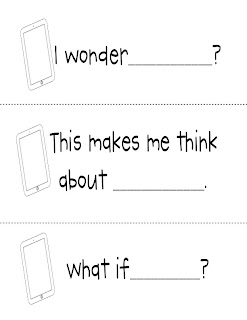
We also had a lesson with our Title 1 Facilitator (who is the bomb.com) and she gave them sentence starters to make their responses and comments more deep and thoughtful. Here is a FREEBIE that you can use to help get your nuggets thinking more deeply. For the lesson, Mrs. Joseph put each sentence starter on a strip of paper and the students pulled on and used that to comment on a video of their choice. I laminated the strips so now they are in the writing center ready to be used whenever a student in commenting! 


Even if your classroom is not a 1:1 ratio, this is still a wonderful app to use if you have access to an iPad cart, small group of iPads or just one! Students can use this app in literature discussion groups, small groups or as a center!

Hope you are having a great Tuesday!